


If you have been working with PHP and WordPress for a while, you have probably run into a question that seems simple at first, but gets much more nuanced in real-world development: should new functionality be built with classes or with functions?
For me, this is not just a theoretical discussion. It is something that comes up from time to time in interviews, when I am asked which development style I prefer. And my honest answer is always the same: I do not believe everything should be built with classes, and I do not believe functional code is always the better shortcut either. In real projects, that kind of black-and-white thinking rarely helps.
Writing everything with PHP classes just because it “looks more professional” is not always the right call. On the other hand, reducing everything to plain functions just because it is faster is not always the smartest choice either. The right approach depends on the actual functionality you are building, its future, the budget, the timeline, and the likelihood that the code will need to grow later.
To me, that is what a mature development mindset looks like.
What Should Drive the Decision?
Before writing any code, it is worth stepping back and asking a few practical questions.
1. How big and complex is the functionality?
If you are dealing with a small enhancement, a single hook, one or two helper functions, or a simple integration with no real long-term plan, there is usually no reason to wrap it in a full class-based architecture with separate services, registrars, and containers.
But if the functionality includes things like:
- multiple related entities,
- dedicated settings,
- admin pages,
- REST API endpoints,
- third-party integrations,
- validation,
- multiple usage scenarios,
then the code stops being “small” very quickly. That is usually the point where a class-based structure starts making sense.
2. Is this functionality likely to evolve?
This is one of the most important questions. A lot of features look simple at the start. But if you already know that:
- new features will be added later,
- the logic may change,
- the project is long-term,
- the client tends to request improvements after launch,
then maintainability should be part of the decision from day one, not something you worry about later.
3. What are the budget and time constraints?
Sometimes a business needs a solution immediately. Sometimes the budget is tight. In those cases, heavy architecture may simply not be worth the extra time.
If the feature is small and the deadline is short, a functional approach can be the more practical choice.
That said, there is a big difference between moving fast and writing messy code. Functional code can still be clean, predictable, and easy enough to maintain if it is written carefully.
4. Who is going to maintain the code later?
If the code is likely to live in the project for years and be touched by other developers, structure matters much more. In those situations, classes often have an advantage because they make it easier to separate responsibilities, organize logic, and define clear entry points.
5. Where will this functionality live?
There is a big difference between:
- a small snippet inside a theme,
- a standalone module,
- an mu-plugin,
- a custom plugin,
- a large integration that talks to multiple external services.
The more independent the code is, and the longer it is expected to live outside the theme itself, the more valuable good structure becomes.
When a Class-Based Approach Is the Right Choice
In WordPress and custom PHP development, this approach also lines up well with recommendations from the official WordPress Plugin Handbook, which references the object-oriented method, file organization, and plugin architecture as useful patterns for more complex and long-term solutions.
The biggest strength of classes is not that they are automatically better. It is that they are often a better fit for code that is expected to grow, change, and be maintained over time.
What a Class-Based Structure Gives You
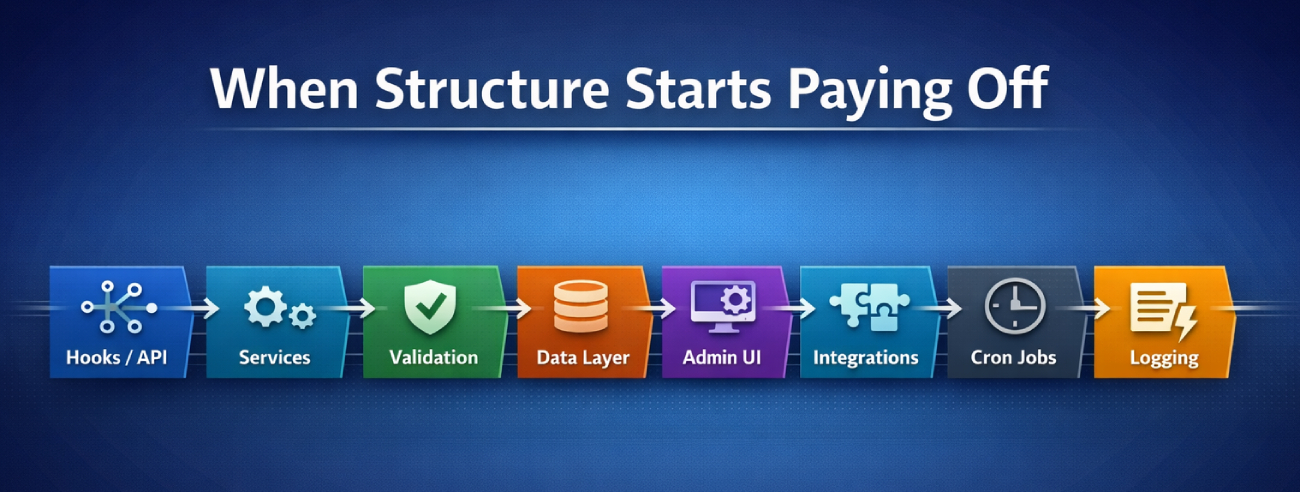
For projects like a regional news aggregator, where you are dealing with many sources, APIs, cron jobs, data processing, caching, logging, and ongoing feature development, a class-based approach is often much easier to justify. In systems like that, the goal is not only to ship the first version quickly, but to have a structure that can be maintained, extended, and improved over time. That is easy to imagine in a project like Kutok.Media, where regional news from across Ukraine is aggregated in one place.
Better structure
When logic is split into classes, it becomes much easier to understand where everything belongs:
- hook registration in one place,
- API logic in another,
- validation separated out,
- data handling separated out,
- admin UI handled independently.
That lowers the risk of turning the project into one oversized file full of functions, where every future change becomes harder to find and harder to make safely.
Better scalability
As functionality grows, classes make it easier to extend the code in a predictable way. You can add services, modules, settings classes, loggers, integration layers, and event handlers without cramming everything into the same procedural flow.
In larger projects, that becomes increasingly important, because maintenance matters just as much as the initial implementation.
Easier to update old code
In long-term projects, code is rarely written once and then left alone forever. More often, it gets expanded, adjusted, and reworked.
When the logic is organized into classes, it becomes easier to:
- isolate changes,
- avoid touching unrelated parts,
- test specific pieces,
- reduce duplication.
Lower risk of conflicts
This matters in WordPress too. Global functions are far more likely to collide, especially in large projects or in codebases with multiple custom modules. Classes and namespaces help reduce that risk and make the code safer to extend.
Better for team collaboration
When multiple developers are working on the same project, class-based code is usually easier to understand and maintain. It is easier for someone new to follow the architecture than when the logic is scattered across functions.php, helpers.php, and a few loosely related custom files.
The downsides of classes
Of course, there are real trade-offs too.
Slower setup
For smaller tasks, a class-based solution almost always takes more time upfront:
- creating files,
- planning the structure,
- registering classes,
- wiring up initialization,
- thinking through dependencies.
Sometimes that extra effort is worth it. Sometimes it is not.
More scaffolding
Part of class-based code is not business logic at all. It is just structure and setup. For small tasks, that can feel like overhead.
Over-engineering is easy
Sometimes developers build architecture for a large product when what they actually need is a small practical feature. The result may look impressive, but it does not always create real value for the client or the business.
So classes are not inherently the better solution. They are simply the better fit when complexity and long-term growth genuinely call for them.
When the Functional Approach Makes More Sense
At the same time, PHP naturally supports a functional style through user-defined functions, callbacks, anonymous functions, and other core language features. That means using functions for small, localized features is not a shortcut or a compromise — it is a perfectly valid way to build.
Functional code is often underestimated, as if it were somehow less serious or less professional. In reality, there are plenty of cases where it is the most appropriate option.
Where a functional approach works especially well
Small, local features
If you need to:
- add a few hooks,
- modify template behavior,
- build a small AJAX handler,
- add a simple integration,
- make a targeted improvement,
then plain functions will often get the job done faster and with much less overhead.
Budget-conscious projects
Not every project has a large budget, and not every client is willing to pay for architecture built for a future that may never come.
In those situations, a functional approach often helps you:
- ship faster,
- keep costs under control,
- avoid spending unnecessary hours on scaffolding,
- build something practical within the project constraints.
Features with no real scaling potential
Sometimes it is obvious from the start that the feature:
- is not going to grow,
- will not become a standalone module,
- will not need complex maintenance,
- is essentially a limited utility.
In those cases, functions are a completely healthy and sensible choice.
Benefits of the functional approach
Faster implementation
This is the biggest advantage. Small features can usually be implemented much faster with a functional approach.
Simplicity
When the logic is short and straightforward, wrapping it in extra architecture often adds more ceremony than value. One well-written function can easily be better than three classes for a small task.
Lower entry barrier
This kind of code is also easier to read quickly, especially in projects where the team or the client is not interested in paying for a heavier architectural setup.
The downsides of the functional approach
This approach also starts to show weaknesses as the codebase grows.
Harder to scale cleanly
As more functionality is added, the risks increase:
- duplicated logic,
- mixed responsibilities,
- temporary fixes piling up,
- oversized files that become harder to manage.
Global namespace issues
This is especially noticeable in WordPress. Without consistent prefixes and clear structure, it is easy to end up with naming conflicts or general chaos.
Maintenance can become more expensive later
What saves time at the beginning can easily cost more in the long run. That is why the functional approach is best when there is little or no expectation of future growth.
A Note on Custom Plugins
For me, the rule here is fairly simple: if a custom plugin is not going to be extremely small and one-off, it is usually better to build it with classes from the start.
Why?
Because a plugin is not just a bit of logic inside a theme. It is a separate unit that:
- has its own lifecycle,
- can be updated,
- can grow over time,
- can be reused across projects,
- often outlives the theme it started with.
Even if the plugin is small at first, if there is a reasonable chance it will later need:
- a settings page,
- custom roles,
- REST API routes,
- cron tasks,
- third-party integrations,
- logging,
- multiple admin screens,
then a class-based structure is usually the more future-proof decision.
For very small utility plugins, there can absolutely be exceptions. If a plugin does one simple thing and is very unlikely to grow, a functional approach can be fine. But the moment growth becomes likely, procedural code inside a plugin tends to become hard to maintain quite quickly.
An Approximate Comparison in Numbers
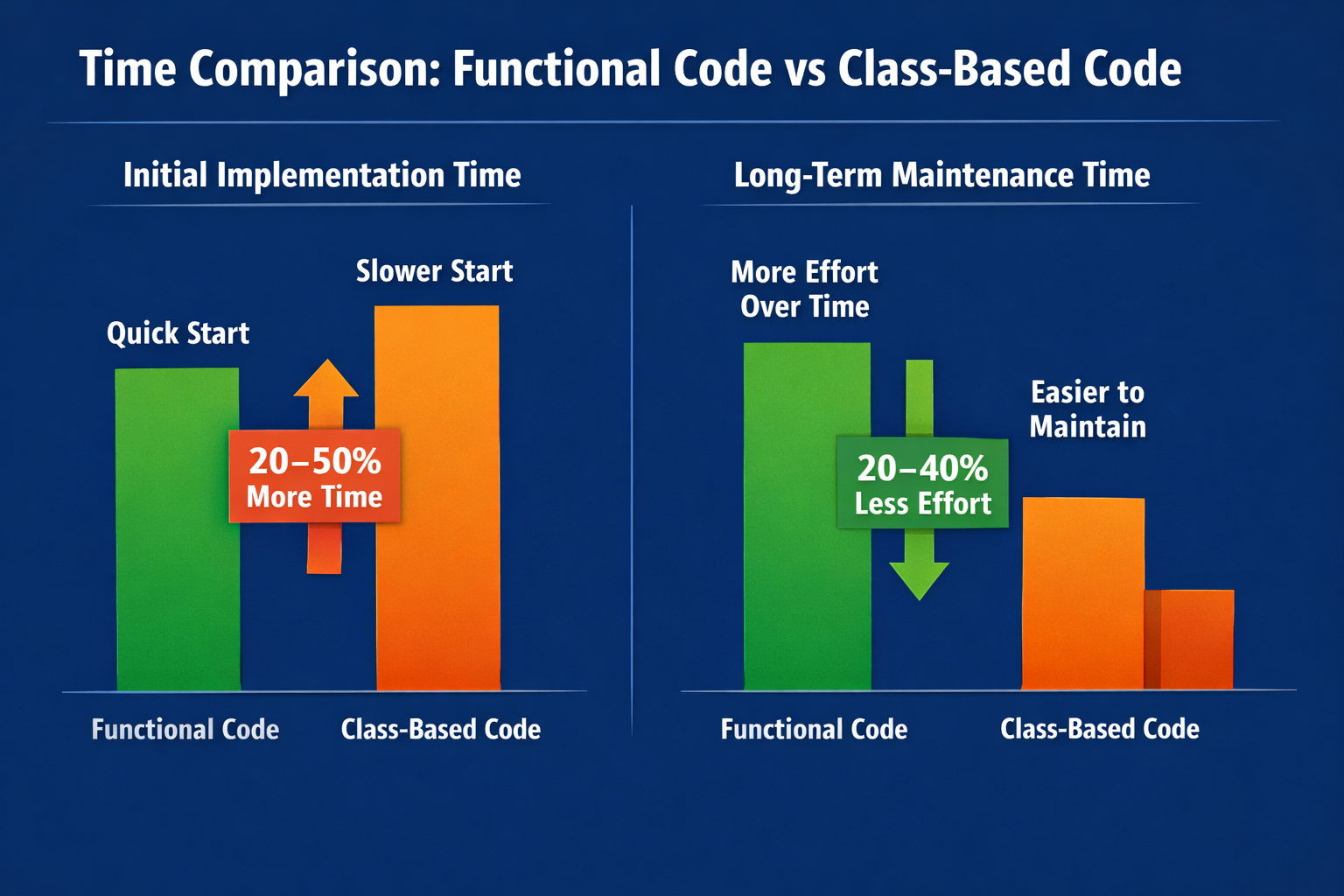 It is important to be honest here: there are no exact universal numbers. It always depends on the task, the developer, the project requirements, and how much architecture is being introduced.
Still, based on practical experience, rough estimates often look like this.
For small new functionality:
- initial implementation with classes: roughly 20–45% slower;
- code size: often 25–60% more lines;
- number of files: usually 2–4 times more;
- future changes: can be 15–35% faster on average if the feature grows.
For a medium or long-term module:
- starting with classes may take 25–50% longer;
- but after several rounds of feature additions and changes, the class-based structure often starts saving time;
- over the long term, maintenance can be 20–40% easier than in a loosely built functional solution.
So in many cases, functional code wins early, while class-based code wins later, if the functionality actually keeps evolving.
A Simple Code Example
Let us look at a very simple example: adding a custom REST endpoint in WordPress that returns a list of posts.
Functional version
<?php add_action('rest_api_init', 'km_register_posts_endpoint'); function km_register_posts_endpoint() { register_rest_route('km/v1', '/posts', array( 'methods' => 'GET',
        'callback' => 'km_get_posts_endpoint',
        'permission_callback' => '__return_true',
    ));
}

function km_get_posts_endpoint(WP_REST_Request $request) {
    $posts = get_posts(array(
        'post_type'      => 'post',
        'posts_per_page' => 5,
        'post_status'    => 'publish',
    ));

    $data = array();

    foreach ($posts as $post) {
        $data[] = array(
            'id'    => $post->ID,
            'title' => get_the_title($post->ID),
            'link'  => get_permalink($post->ID),
        );
    }

    return rest_ensure_response($data);
}
Pros
- quick to write;
- minimal file count;
- easy to understand for a small task;
- perfectly sufficient for limited functionality.
Cons
- if the feature later grows to include multiple endpoints, validation, caching, logging, and permission logic, the code can become messy quickly;
- scaling it cleanly becomes harder over time.
Class-based version
<?php class KM_Posts_API { public function init() { add_action('rest_api_init', array($this, 'register_routes')); } public function register_routes() { register_rest_route('km/v1', '/posts', array( 'methods' => 'GET',
            'callback'            => array($this, 'get_posts'),
            'permission_callback' => array($this, 'permissions_check'),
        ));
    }

    public function permissions_check(WP_REST_Request $request) {
        return true;
    }

    public function get_posts(WP_REST_Request $request) {
        $posts = get_posts(array(
            'post_type'      => 'post',
            'posts_per_page' => 5,
            'post_status'    => 'publish',
        ));

        $data = array();

        foreach ($posts as $post) {
            $data[] = array(
                'id'    => $post->ID,
                'title' => get_the_title($post->ID),
                'link'  => get_permalink($post->ID),
            );
        }

        return rest_ensure_response($data);
    }
}

$km_posts_api = new KM_Posts_API();
$km_posts_api->init();
Pros
- the logic already has structure;
- adding new methods is straightforward;
- permissions, validation, formatting, and service logic are easier to separate;
- much easier to extend later.
Cons
- for a very small task, it takes more time and adds more weight;
- there is more scaffolding;
- it is not always worth it for minor features.
The Conclusion I Have Come To
In my experience, clients usually do not understand — and frankly do not need to understand — which technical approach is better. What matters to them is much simpler:
- will it work,
- how much will it cost,
- how long will it take,
- can it be changed later?
That is why the responsibility for making this decision sits with the developer.
And that means it is not enough to just “have a preferred style.” A good developer needs to ask the right questions in order to understand the real need behind the request:
- Is this functionality expected to grow?
- Will it need to scale?
- Is there budget for a more flexible structure?
- How important is the speed of the initial delivery?
- Who is going to maintain this code six months from now?
If you decide to go with a class-based approach, you should be ready to explain that decision clearly. Not in the sense of saying, “this is more proper,” but in business terms:
- it takes longer now, but will be cheaper to maintain later;
- it creates structure for future changes;
- it reduces chaos if the module grows.
If the functionality is small, local, budget-driven, and unlikely to evolve, then a functional solution is often the more honest and practical choice.
For me, the main takeaway is simple:
the real question is not whether classes or functions are better. The real question is which one is more appropriate for the specific job.
A strong developer is not the one who forces the same approach everywhere. It is the one who knows how to choose the right tool for the task in front of them.